What is Terrasect?
Terrasect lets you divide your Minecraft world into named regions — laid out as a hex grid, Voronoi cells, recursive subdivisions, surround shapes, or scattered islands — and give each region its own rules for how the world generates there. One region can be a lush, gentle plain; its neighbor a jagged, monster-infested wasteland with its own loot table — all in the same world, all from the same seed, every time.
Nothing here is random per-visit: the same seed always produces the same layout, so a region you found once will still be there next time.
Issues and suggestions
Found a bug, or have an idea for something Terrasect should do? Open an issue on the GitHub issue tracker — bug reports and suggestions are both welcome.
Features
- Terrain & climate shaping. Push a region's terrain flatter or rougher, and override its temperature, humidity, and other climate values independently of the surrounding world.
- Height limits. Cap how high or low a region is allowed to build.
- Structure control. Allow, block, or force specific structures (or whole mod/structure-tag groups) inside a region — want every plains village replaced with a pillager outpost? Done.
- Mob spawn control. Allow or block specific mobs (or entire mob tags) from spawning in a region, both during world generation and during normal play.
- Loot control. Allow or block loot table entries (or loot tags) inside a region.
- Five ways to lay out regions. Hex grid, Voronoi cells, recursive subdivision, surround shapes, and scattered archipelagos — pick whichever shape language fits the world you're building.
- Simple config, or code if you want it. Define regions in plain text preset files, or build them programmatically if you're writing your own add-on.
- Built to stay fast. Region lookups are cached per chunk, so adding a lot of regions doesn't mean a laggy world.
Supported versions
| Minecraft | Fabric | NeoForge |
|---|---|---|
| 1.20.1 | ✅ | — |
| 1.21.1 | ✅ | ✅ |
| 1.21.11 | ✅ | ✅ |
| 26.1 | ✅ | ✅ |
| 26.2 | ✅ | ✅ |
Fabric builds additionally require Fabric API and Fabric Language Kotlin. NeoForge builds additionally require Kotlin for Forge. Grab the matching dependency versions from the same release page as the Terrasect jar you download.
Quick start
- Install Terrasect and its loader-specific Kotlin dependency (see above) like any other mod.
- Launch the world once — Terrasect creates a
config/terrasect/folder with an example preset and aconfig.tomlfile. No preset is active yet at this point, so world generation is untouched. - Open
config/terrasect/config.tomland setpresetto the name of a preset file in that folder (without the.tomlextension) to activate it. - Restart the game or server. Config changes are only read on startup.
See Getting Started below for a step-by-step walkthrough, the complete region/strategy reference (with pictures), and dedicated pages for noise, structures, and loot constraints.
Known limitations
Terrasect is under active development. A few preset options are accepted today but don't yet change generation: restricting a region to specific biomes, enforcing a region's height limits, and overriding precipitation or an inherited climate preset. These are recognized and validated, just not wired up to world generation yet — check the project's Known Issues page for the current state before relying on them.
License & AI disclosure
Terrasect is MIT licensed — use it, fork it, learn from it.
LLMs were used extensively in building this mod, and some of the codebase is admittedly rough around the edges as a result. The point of this project was the idea — region-based world generation control — not a polished implementation. If you want to take the idea further in your own mod, you're encouraged to; we'd love to hear about it.
Getting Started
Install
- Install Fabric Loader or NeoForge for a supported Minecraft version (see the versions table on the home page).
- Install the matching Kotlin dependency:
- Fabric: Fabric API + Fabric Language Kotlin
- NeoForge: Kotlin for Forge
- Drop the Terrasect jar for your version and loader into your
modsfolder, like any other mod.
First launch
Launch the game or server once. Terrasect creates a config/terrasect/ folder containing:
config.toml— global settings and which preset is activeexample.toml— a working example preset, showing off every constraint typeclimate_debug.toml— a small preset useful for inspecting climate values
No preset is active yet at this point, so your world generates exactly like vanilla. Terrasect only changes generation once you deliberately turn it on.
Activate a preset
Open config/terrasect/config.toml and set:
preset = "example""example" refers to example.toml in the same folder — the preset name is just the file name without .toml. Restart the game or server (config is only read on startup) and your overworld will generate using that preset.
Write your own preset
Create a new .toml file in config/terrasect/ (or copy and edit example.toml) and point preset at it. Every preset needs a schema version, at least one dimension root, and one or more named regions:
schema = 1

[roots]
"minecraft:overworld" = "world"

[regions.world]
radius = 200

[regions.world.strategy]
type = "hex"

[regions.forest]
parent = "world"
budget = 40000

[regions.forest.mobs]
block_names = ["minecraft:zombie"]
This carves the overworld into a hex grid, and every hex cell named forest blocks zombies from spawning. See Regions for every strategy and how they nest, and Decorations, Noise & Climate, Archetypes, Structures, Mobs, and Loot for the rest of what a region can control.
Check your work in-game
Once a preset is active, use the /ts commands to see exactly which region you're standing in, list its neighbors, and inspect its full resolved configuration — no need to guess whether your preset is doing what you expect.
Regions
What is a region?
A region is a named area of a dimension. Every preset starts with one or more root regions — each mapped to a dimension (minecraft:overworld, minecraft:the_nether, or a modded dimension) — and every other region is a child of some parent region, sized either by a fixed radius or a target budget (an approximate area in blocks; Terrasect works out a matching size for you).
A region on its own doesn't have to do anything special — it only becomes interesting once you give it a strategy (how its own children divide up its space) and/or constraints (noise, climate, structures, mobs, loot — see the other doc pages). Regions without children are leaves: this is where constraints actually apply to the world.
[regions.world]
radius = 200

[regions.forest]
parent = "world"
budget = 40000
Here forest is a plain child of world with no strategy of its own — it's a leaf, ready to carry constraints. To split world into many named cells instead of one, give world a strategy.
Strategies
A strategy answers one question: when this region's space is divided into named children, what shape do the pieces take? Every image below is a real image generated straight from Terrasect's own strategy code, not a mockup.
Hex
Splits an area into a honeycomb of hexagonal cells. Good for worlds that want an obviously structured, grid-like feel.
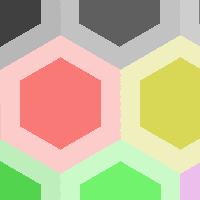
[regions.world.strategy]
type = "hex"
tiling = true # repeat the grid across the whole parent (default)
Voronoi
Scatters seed points and gives each one the area closest to it — organic, cell-like shapes with no two alike. This is the classic "biome blob" look.
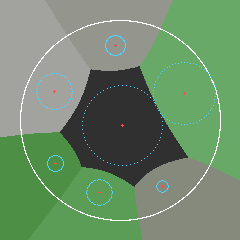
[regions.world.strategy]
type = "voronoi"
tiling = false # a single cluster of cells inside the parent (default)
Subdivision
Recursively splits a shape into smaller pieces — bands, wedges, or nested slices, depending on settings. Good for gradients and layered terrain.
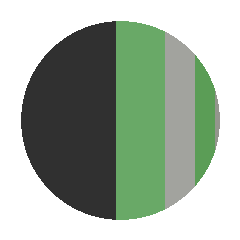
[regions.world.strategy]
type = "subdivision"
Surround
Wraps one region entirely around another, like a moat or a border ring. Point it at an existing sibling/child region and it forms a ring around it.
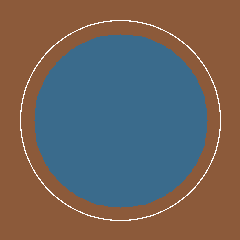
[regions.world.strategy]
type = "surround"
surround_region = "core" # the region to wrap around
Archipelago
Scatters discrete, separated blobs — islands — rather than tiling the whole area edge-to-edge. Each island gets its own child region, and the rest stays as a "sea" region.
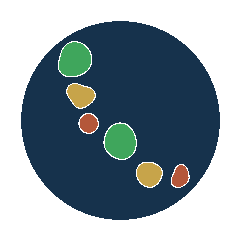
[regions.world.strategy]
type = "archipelago"
sea_region = "ocean" # the leftover space between islands
Nesting and composition
Strategies compose: any child produced by a strategy can have its own strategy for its children. A big hex grid can have each individual hex cell further split by Voronoi, subdivision, or another hex grid — as deep as you want.
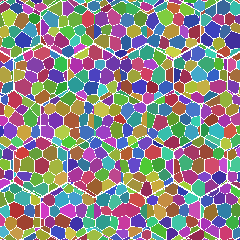
This is what makes a handful of strategies produce worlds that don't feel repetitive: a coarse hex or Voronoi layer sets the broad shape of your world, then each cell gets its own independent sub-layout underneath.
Softening the edges
Region boundaries don't have to be perfectly geometric — see Decorations for warping, rippling, terracing, and otherwise distorting a region's boundaries so they read as natural rather than mathematical.
Checking your layout in-game
Once your preset is active, walk around and use /ts query or open the F3 debug screen to see exactly which region you're standing in at any moment — see Commands & Debug UI.
Decorations
What are decorations?
A strategy (see Regions) decides the basic shape of a region's children — hexagons, Voronoi cells, and so on. Decorations distort that shape afterwards, so borders read as natural or stylized instead of perfectly geometric. Every image below (including the "before" one) is generated straight from Terrasect's own decoration code, applied to the same plain tiled-Voronoi layout, so you can compare them directly.
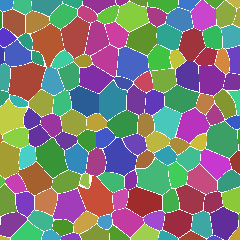
Decorations go on the parent region — the one with the strategy — and affect how all of its children's boundaries look:
[regions.world.strategy]
type = "voronoi"
tiling = true

[[regions.world.decorations]]
type = "warp"
amplitude = 12.0
scale = 48.0
You can stack more than one decoration on the same region — each [[regions.world.decorations]] table adds another one, applied in order.
There are two kinds, though you don't need to track which is which to use them: domain decorations bend the space itself before the strategy decides ownership (so every boundary in the region warps together, and locating a point still lines up with what you see); layer decorations reshape one child's own edge on top of that (gaps, rings, stripes). The reference below groups them that way just for context.
Domain decorations
Warp
Smooth, organic distortion — the classic "hand-drawn" look.
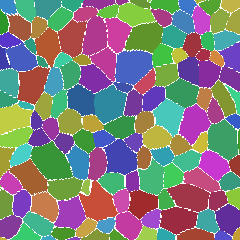
[[regions.world.decorations]]
type = "warp"
amplitude = 12.0 # how far edges bend
scale = 48.0      # how large the bends are (bigger = smoother, broader waves)
octaves = 2       # optional, layers of detail (default 2)
Dither
A subtler, higher-frequency version of warp — light roughness rather than big bends.
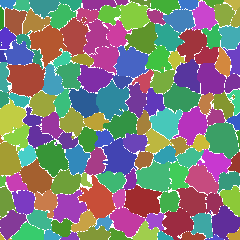
[[regions.world.decorations]]
type = "dither"
width = 4.0
scale = 6.0 # optional, default 8.0
Swirl
Rotates space around the region's center, twisting nearby boundaries into a spiral.
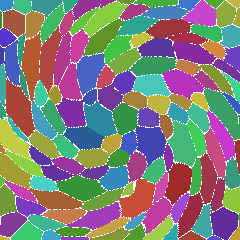
[[regions.world.decorations]]
type = "swirl"
strength = 1.4 # how much rotation at the center
radius = 130.0  # how far the effect reaches
Ripple
Wavy, rippling edges — good for water-adjacent or dreamlike regions.
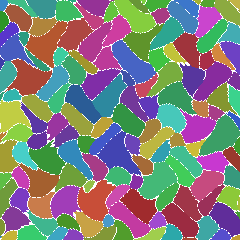
[[regions.world.decorations]]
type = "ripple"
amplitude = 7.0
wavelength = 52.0
Shear
Slants space along one axis, tilting every boundary in the same direction.
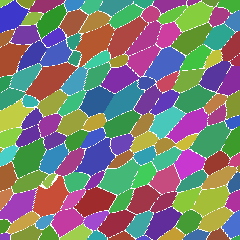
[[regions.world.decorations]]
type = "shear"
x = 0.6 # optional, default 0
z = 0.0 # optional, default 0
Terrace
Snaps space onto a coarse grid, turning smooth curves into blocky, stepped edges.
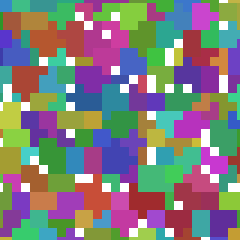
[[regions.world.decorations]]
type = "terrace"
step = 9.0
Layer decorations
Gap
Pulls every child's boundary inward slightly, leaving a visible strip of the parent's own space between neighboring children.
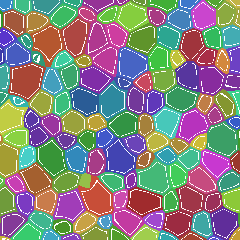
[[regions.world.decorations]]
type = "gap"
width = 4.0
Onion
Turns each filled child into a thin shell — a ring outline instead of a solid area.
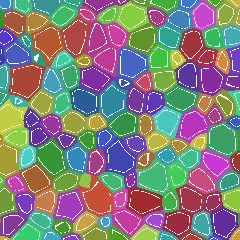
[[regions.world.decorations]]
type = "onion"
thickness = 5.0
Stripes
Cuts repeating parallel stripes through every child, at any angle.
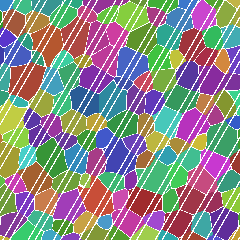
[[regions.world.decorations]]
type = "stripes"
width = 16.0
gap = 6.0
angle = 30.0 # optional, degrees, default 0
Rings
Cuts repeating concentric rings around the region's center through every child.
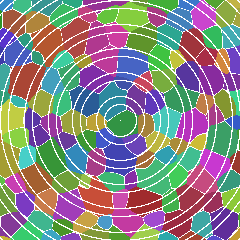
[[regions.world.decorations]]
type = "rings"
width = 16.0
gap = 8.0
Noise & Climate
Climate
A region can push a dimension's climate values in a direction, either as a single number or a min, max range:
[regions.desert.climate]
temperature = [4000, 10000]
humidity = -8000
precipitation = "none"
Available climate values: temperature, humidity, continentalness, erosion, depth, weirdness, precipitation, and climate_preset. Child regions inherit whatever their parent doesn't override, so you only need to set what's actually different about a region.
Height
Cap how high or low a region is allowed to build, either an exact value or a range:
[regions.canyon.height]
range = [40, 90]
Terrain (noise)
For finer control than climate alone, a region can transform the underlying noise/density values that shape terrain — for example, flattening a region or exaggerating its bumpiness:
[regions.flatlands.noise]
blend_width = 24.0 # how smoothly this region's noise blends into its neighbors

[regions.flatlands.noise.density_functions]
continents = [
  { op = "multiply", factor = 0.0 },
  { op = "add", value = 0.35 },
]
Each entry is a small chain of operations applied in order to one of the terrain generator's internal values (named per Minecraft version — Terrasect handles that mapping for you). Available operations: clamp, add, multiply, remap, map, abs, square, cube, half_negative, quarter_negative, invert, and squeeze. Think of this as a small pipeline: each step reshapes the value a little more before it reaches the terrain generator.
This is the most powerful (and most technical) constraint type — most presets get most of their character from climate and structure/mob/loot rules alone, and only reach for noise transforms when they want a genuinely different terrain shape in one region. If you just want a common shape like an ocean, a raised plateau, or flat lowlands without hand-tuning values yourself, see Archetypes — ready-made noise/climate bundles you can drop onto a region and still override.
Current limitations
A few options are accepted in preset files today but don't change generation yet: restricting a region to specific biomes, enforcing a region's height range, and overriding precipitation or climate_preset. They're validated and preserved through config round-trips, just not wired up to world generation yet. Check the project's Known Issues page for the current status before relying on them.
Archetypes
What is an archetype?
Hand-tuning noise and climate values (see Noise & Climate) gives you the most control, but it takes some trial and error to get a recognizable terrain shape. An archetype is a ready-made bundle of noise and climate values for a common terrain shape — apply one to a region and it fills in sensible defaults for you.
Archetypes only fill in values the region hasn't already set. Anything you set explicitly on a region — its own noise or climate tables — always wins over the archetype, and the archetype always wins over whatever the region would otherwise inherit from its parent. Think of an archetype as a starting character for a region, not a lock on it.
[regions.bay.archetype]
type = "ocean"
depth = 0.7
Available archetypes
Ocean
Open water, generated the same way a real vanilla ocean is — natural depth, a natural aquifer filling it to sea level, no extra cost. depth (0–1, default 0.6) controls how deep.
[regions.sea.archetype]
type = "ocean"
depth = 0.6
Landlocked
Keeps the surface above sea level so no ocean forms in the region, while vanilla rivers and lakes still cut through normally. shore (0–1, default 0.3) nudges the region closer to the coast without ever reaching the ocean band.
[regions.heartland.archetype]
type = "landlocked"
shore = 0.3
Flatlands
Gentle, low terrain — flattened and settled below the usual terrain height, but still above sea level. strength (0–1, default 0.7) controls how flat and how low; 1 is flattest and lowest.
[regions.plains.archetype]
type = "flatlands"
strength = 0.7
Highlands
A raised plateau — inland, low erosion, and a lifted surface. strength (0–1, default 0.7) controls how dramatic the rise is; 1 is highest.
[regions.plateau.archetype]
type = "highlands"
strength = 0.7
Combining with your own constraints
Archetypes are meant to be layered under your own tweaks, not instead of them. A common pattern is an archetype for the overall terrain shape, plus a region's own climate, structures, mobs, or loot tables for everything else:
[regions.frontier.archetype]
type = "highlands"
strength = 0.9

[regions.frontier.mobs]
block_names = ["minecraft:zombie"]
Structures
Allow or block structures
A region's structures table filters which structures are allowed to generate there, by mod, structure tag, or exact name:
[regions.wasteland.structures]
allow_mods = ["minecraft"]
block_names = ["minecraft:village_plains", "minecraft:village_desert"]allow_mods/block_mods— filter by the mod (namespace) that adds the structureallow_tags/block_tags— filter by structure tag (e.g.minecraft:village)allow_names/block_names— filter by exact structure id
An allow_* list means only those structures are permitted in the region; block_* removes specific structures while leaving everything else untouched. Leave both empty and the region doesn't restrict structures at all.
Spacing, separation, and frequency
A region can also override how densely its structures are spaced, using the same knobs Minecraft's own structure placement uses:
[regions.dense_ruins.structures]
spacing = 16
separation = 6
frequency = 1.0
Forcing a structure
Instead of just allowing a structure to maybe generate, you can force one to always exist somewhere inside a region — deterministically, from the world seed, exactly once:
[regions.spawn.structures]
force = [
  { name = "minecraft:village_plains", radius = 96 },
]
A forced entry takes a structure name and, optionally, radius or budget (not both) to control roughly how much space around it is reserved. Once you've found the region containing a forced structure, /ts locate will tell you exactly where it landed.
Mobs
Allow or block mob spawns
A region's mobs table filters which mobs are allowed to spawn there, by mod, entity tag, or exact entity id — both when the world first generates a chunk and during normal, ongoing spawning while you play:
[regions.sanctuary.mobs]
block_names = ["minecraft:zombie", "minecraft:skeleton"]allow_mods/block_mods— filter by the mod (namespace) that adds the entity typeallow_tags/block_tags— filter by entity type tag (e.g.minecraft:undead)allow_names/block_names— filter by exact entity id
An allow_* list means only those mobs are permitted to spawn in the region; block_* removes specific mobs while leaving every other spawn untouched. Leave both empty and the region doesn't restrict spawning at all.
This governs whether a spawn is allowed to happen in the first place — it doesn't affect mobs that already exist (from a spawner, a mod, or wandering in from outside the region), and it doesn't touch the mob's other spawn rules (light level, block type, and so on); it's an extra region-shaped filter on top of everything vanilla already checks.
Loot
Allow or block dropped items
A region's loot table filters the items that come out of loot generation inside it — chest loot, mob drops, block drops, anything that rolls a loot table at a real position in the world — by mod, item tag, or exact item id:
[regions.desert.loot]
block_tags = ["c:foods"]allow_mods/block_mods— filter by the mod (namespace) of the dropped itemallow_tags/block_tags— filter by item tag (e.g.c:foods,minecraft:swords)allow_names/block_names— filter by exact item id
An allow_* list means only matching items are kept in a roll's final results; block_* removes just the matching items and leaves the rest of the roll untouched. This applies after the vanilla loot table has already rolled — Terrasect filters the resulting items rather than rewriting loot tables, so it works alongside other mods' loot table changes without conflicting.
Commands & Debug UI
/ts commands
Terrasect adds a /ts command with three subcommands. All of them require operator permissions on a server (you already have this in singleplayer).
/ts query
Tells you which region you're standing in right now, and lists its named children (if it has a strategy):
/ts query
> #3f2a.cell > .forest :
- #3f2a1c.meadow
- #3f2a1d.rocks
Add a selector to look up a specific region relative to where you're standing instead:
/ts query .desert/ts print
Like query, but with the full picture: the region's center, distance from you, bounding box, approximate area, which strategy it uses, its children, and — if it comes from a preset — the resolved TOML for that region, exactly as Terrasect understands it:
/ts printThis is the fastest way to check "is my preset actually doing what I think it's doing?" without digging through config files.
/ts locate <selector>
Finds a named region anywhere in the current dimension and reports its center coordinates and your distance from it — handy for tracking down a forced structure or just finding a named region you haven't visited yet:
/ts locate .village_plainsSelectors
A selector picks out a region by name (.name), by its exact instance address (#address), or both together (#address.name). Chain selectors with > to require an immediate parent/child relationship:
.forest              -- any region named "forest", anywhere
.cell > .meadow       -- a "meadow" that is a direct child of a "cell"
#3f2a.cell            -- the one specific "cell" instance at address 3f2a
query and print default to your current region when you don't give a selector.
Debug overlay (F3)
On Minecraft 1.21.11 and newer, Terrasect adds a line to the vanilla F3 debug screen showing your current region chain from root to the deepest match, each with its distance from the region boundary — the same information /ts query gives you, always visible while you play. (The debug screen's plugin API doesn't exist on older supported versions, so this is 1.21.11+ only; the /ts commands work everywhere.)